5 min read
Office Chair Dimensions: What Is the Right Seat Height?
Office chair dimensions and seat height explained: desk and chair height, seat depth, lumbar support and armrests for an ergonomic setup. Read the guide.
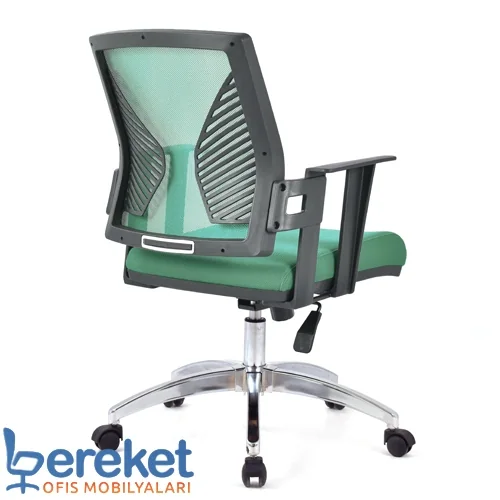
The right office chair dimensions and the right seat height go a long way toward deciding whether you finish the day with back, neck or shoulder pain. Even an expensive chair is uncomfortable if it is set up wrong. As a mesh office chair manufacturer and repair workshop, we walk you through a practical ergonomic setup step by step.
Why do office chair dimensions matter?
Office chair dimensions matter because your body adapts to the shape of the chair all day long. When seat height, seat depth, lumbar support and armrests do not fit you, your muscles keep compensating and fatigue builds up. Correct dimensions and a proper setup support good posture and reduce discomfort for people who sit at a desk for hours.
In Europe, office chair dimensions and test methods are generally defined by the EN 1335 standard. Whatever the standard, the key point is that the chair can be adjusted to your body. The tips below are general ergonomic guidelines; if you have a specific health condition, please consult a professional.
What should your seat height be?
At the right seat height, your feet rest flat on the floor and your knees form roughly a 90-degree angle. Your thighs should be parallel to the floor or your knees very slightly below your hips. A seat that is too high presses under the thighs, while one that is too low lifts the knees and rounds the lower back.
To set your seat height:
- Stand in front of the chair; the seat should be just below your kneecap.
- Sit down and place your feet flat on the floor.
- Check your knee angle and raise or lower the seat with the height lever.
- If your desk is fixed and your feet do not reach the floor, use a footrest.
The part that holds your seat height is the gas lift. If the chair slowly sinks, no setting will hold, and the gas lift should be checked.
How do you match desk and chair height?
Desk and chair height are matched when your elbows are level with the keyboard and your shoulders are relaxed. Standard work desks are typically around 72–75 cm high. At that height, the best starting point is to set the chair so your forearms are roughly parallel to the desk and your elbows are close to 90 degrees.
If your desk height cannot be adjusted, set the chair to elbow height first, then use a footrest if your feet no longer reach the floor. In our service department, the most common mistake we see is a chair left at its lowest or highest position out of habit.
How deep should the seat be?
With the right seat depth, there is about a fist-sized gap between the back of your knees and the front edge of the seat when you sit fully back. A seat that is too deep stops you from using the backrest and makes you slide forward. A seat that is too shallow leaves your thighs unsupported and concentrates pressure.
Some chairs offer a seat slider to adjust depth. If yours does not, choose a model whose seat depth suits your leg length. Seat width should fit your hips comfortably.
How do you set lumbar support and backrest angle?
Lumbar support should sit in the natural inward curve of your lower back. If it is too high, it pushes into your mid-back; too low, and it does nothing. The backrest should be upright or slightly reclined, because sitting bolt upright and motionless for hours is tiring for the back and shoulders.
A mesh backrest flexes to your body shape and lets air through, which reduces sweating during long hours. We cover this in more detail in our article on ergonomic mesh office chairs and back health.
- If lumbar support is adjustable, align it with the deepest point of your lower back.
- If the backrest locks, use a few different angles during the day.
- On synchro mechanisms, set the tension to suit your weight.
Where should armrests and the monitor be?
Armrests should be at roughly elbow height, so your elbows rest lightly while your shoulders stay relaxed. Armrests that are too high push your shoulders up; too low, and you lean to one side. The top edge of your monitor should be at about eye level and the screen around arm's length away to keep your neck straight.
Armrests should also not stop you from pulling the chair close to the desk; if they do, lower them.
Office chair adjustment checklist
The easiest way to know your office chair is set up correctly is to check each adjustment point with a simple test. The table below shows what each setting is based on and how to check it. Repeat these checks when you first get the chair and whenever your desk, screen or the person using the chair changes.
| Adjustment | Based on | How to check |
|---|---|---|
| Seat height | Feet and knees | Feet flat on the floor, knees about 90° |
| Desk fit | Elbow height | Forearms near parallel to the desk, shoulders relaxed |
| Seat depth | Leg length | About a fist's gap behind the knees |
| Lumbar support | Lower back curve | Support sits in the lower back |
| Backrest angle | Type of work | Upright or slightly reclined, back fully supported |
| Armrest height | Elbow level | Elbows rest lightly, shoulders not raised |
| Monitor | Eye level | Top of screen at eye level, neck straight |
Choosing an office chair by user height
When choosing an office chair by user height, the key is not a single number but the chair's adjustment range. Taller users need a higher seat range, a deeper seat and a high backrest. Shorter users are usually more comfortable with a lower seat, a shorter seat depth and often a footrest under the desk.
| User profile | Priority adjustment |
|---|---|
| Taller users | High gas lift range, deep seat, high backrest or headrest |
| Average height | Standard range, adjustable lumbar support |
| Shorter users | Low seat setting, short seat depth, footrest |
| Shared chair | Wide adjustment range, easy levers, durable gas lift |
Choose a mesh office chair that fits you
A chair with the right dimensions starts with a wide adjustment range and a solid mechanism. For long desk hours, a mesh work chair with adjustable seat, lumbar support and armrests is a good start; if you want a higher back and a wider seat, look at our executive mesh office chairs.
Our chairs are made to order, and we also repair existing chairs.
For pricing, request a quote or get in touch through our contact page.
Frequently asked questions
Your seat height is right when your feet are flat on the floor, your knees are at about 90 degrees and your thighs are roughly parallel to the floor. With a fixed desk, set the chair to elbow height first and add a footrest if needed.
Standard work desks are typically around 72–75 cm high. At that height, set your chair so your forearms are close to parallel with the desk.
Sit fully back against the backrest and check the gap between the back of your knees and the seat edge. About a fist-sized gap means the depth suits you.
Armrests should be at roughly elbow height, so your elbows rest lightly without lifting your shoulders. If they stop you from pulling up to the desk, lower them.
Look for a wide gas lift range, a deeper seat and a high backrest. Executive mesh office chairs are often a good fit for taller users.